Your everyday AI.
In your pocket.

Ask questions, understand documents, work through problems, and write code. All on your iPhone.

Free, unlimited on-device AI. No account.

Optional cloud AI is available with Pro, with a monthly usage limit.

Offline chat

A question.
A conversation.

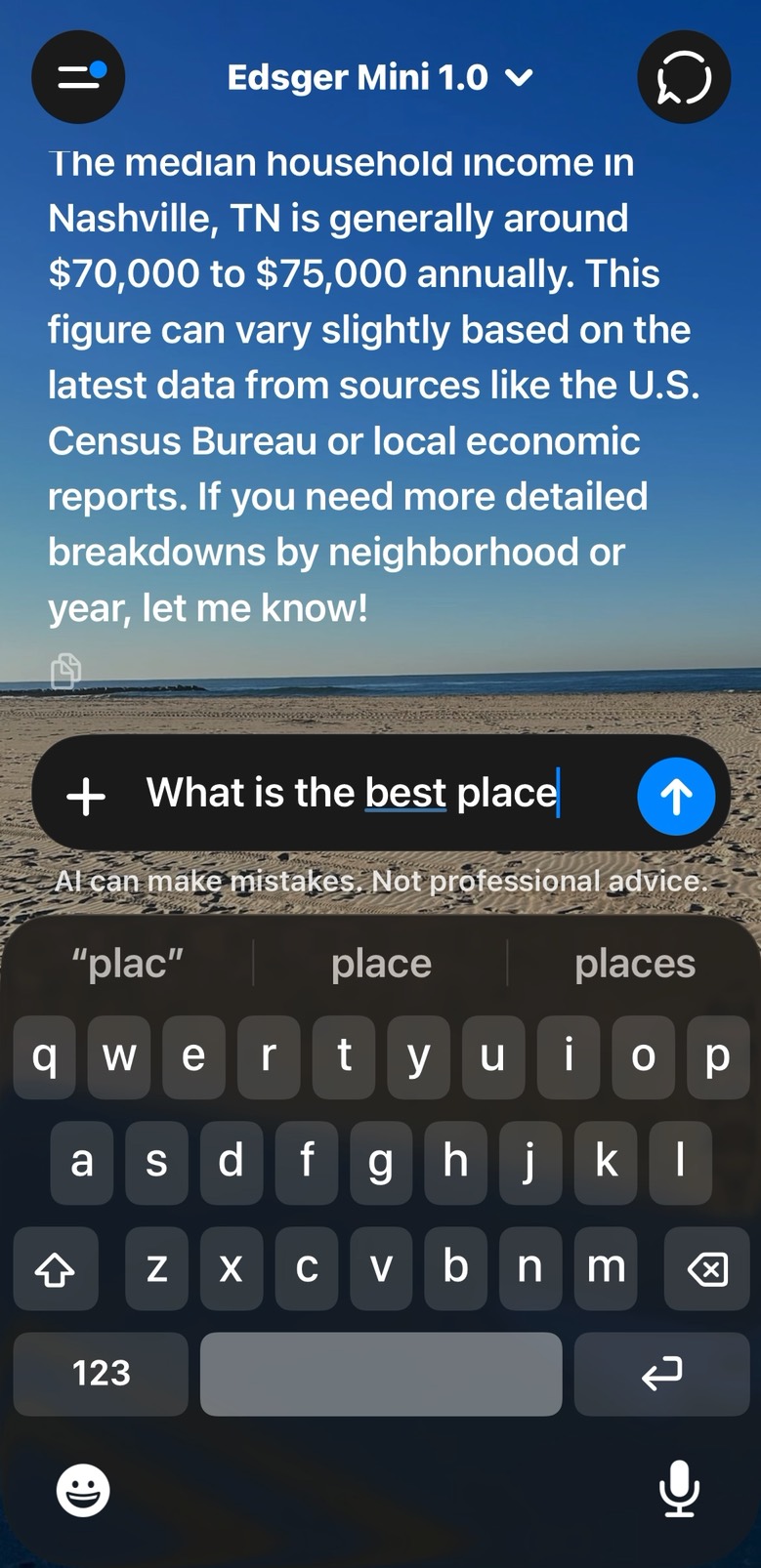
See Edsger Mini in a real conversation. Follow your curiosity with AI that runs on your phone.

Edsger Mini · powered by Liquid AI
On-device AI · free local chat
Offline Local AI & code execution
Unlimited Free on-device AI access
4 languages C · Python · JavaScript · Lua
No account Download and start

Chat, learning, and coding

Move between a conversation and a coding workspace. Follow a question, test an idea, or build a project wherever you are.

Chat & learning

Chat with on-device AI

Ask about code, math, science, or the subject on your mind. Attach a document, ask follow-up questions, and work through an explanation at your pace.

  • Questions grounded in your uploaded documents
  • On-device math tools and worked steps
  • Saved conversations you can return to
Edsger Mini chat screen with an on-device conversation
Edsger Mini chat

Editor & runtimes

Write and run code

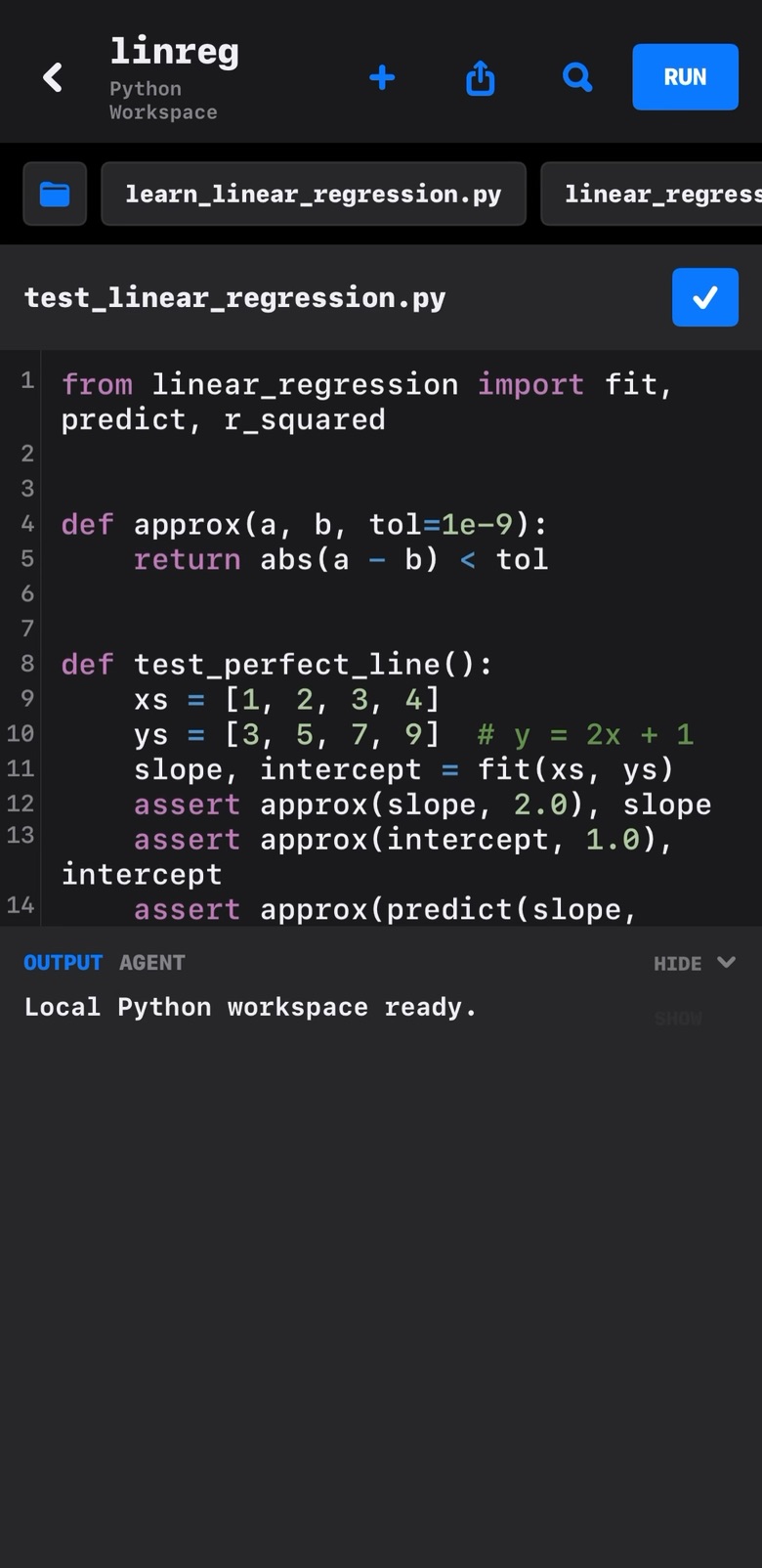
Write C, Python, JavaScript, and Lua in their own project workspaces. Run programs on your device, interact with the console, and follow errors back to your code.

  • Syntax highlighting and console input
  • Local files, projects, and language workspaces
  • Run, inspect the output, and stop when you need to
Edsger Python editor showing a linear regression test file and output console
Python project editor

Coding agent

The agent can inspect your project, edit files, and use the app’s local runtimes. You can review the result and return to a restore point.

See the agent in action
  1. 01

    Give it a direction

    Ask for a new program, a fix, or a change to an existing project.

  2. 02

    Let it work with your files

    The agent reads the project and makes changes within Edsger’s workspace.

  3. 03

    Test the result

    Inspect the code, test it, and keep what works. Restore earlier changes when you need to.

Four languages. On your device.
C PicoC Python CPython JavaScript JavaScriptCore Lua Lua runtime

AI models

Edsger brings third-party AI models into a workspace built for learning and coding. These are our in-app names, with the underlying models listed here.

FREE · ON DEVICE

Edsger 1.0

Powered by Qwen3.5-4B

Offline chat and the local coding agent. Runs on your device without a cloud AI connection.

Unlimited local access
FREE · ON DEVICE

Edsger Mini 1.0

Powered by Liquid AI
LFM2.5-1.2B-Instruct

A smaller model for everyday offline conversations. Choose it from the Chat model menu.

Unlimited local chat
PRO · CLOUD

Dijkstra Super Fast 1.0

Powered by DeepSeek

Cloud AI integrated with Chat and the coding agent. Internet access and sharing consent are required.

Monthly usage limit applies

Local AI keeps inference on your device. Selecting a cloud model sends the relevant request content to its provider. Local and cloud models use the app’s available tools and runtime limits.

Plans and pricing

The editor, local runtimes, and on-device AI are free. Pro adds cloud AI, your own provider connections, and more ways to work.

The everyday essentials

Free

$0 for local features

Start learning and building on your device.

  • Unlimited on-device AI chat
  • Local coding agent
  • C, Python, JavaScript, and Lua
  • Editor, projects, and console
  • Documents and on-device math tools
Download free
More ways to create

Pro

$10 / month

Everything in Free, plus connected tools.

  • Dijkstra cloud AI for Chat & Agent
  • Included monthly cloud usage
  • Connect your OpenAI or Claude API key
  • Push projects to GitHub
  • Photos in cloud Chat
  • Custom Chat notes and personalization
Explore Pro in the app
More room for cloud work

Pro Plus

$25 / month

All Pro features, with a larger monthly cloud allowance.

  • Everything included with Pro
  • More included Dijkstra usage
  • Same Chat and coding workspace
  • Same provider and GitHub connections
  • Unlimited local AI remains available
Explore Pro Plus

Unlimited applies to on-device AI. Cloud use is metered by request and response size, with a monthly limit. Your remaining allowance is shown in the app. When it cannot cover another cloud request, local AI remains available.

Your API provider bills BYOK usage separately. ChatGPT and Claude consumer subscriptions do not include API usage. Prices shown are US prices; the App Store displays your regional price. Paid plans renew monthly until canceled. Manage subscriptions in your Apple Account settings.

Know what
you’re getting.

A useful app starts with clear expectations.

Ask us a question
What is free and unlimited?

The on-device AI models, local coding agent, editor, and four language runtimes are free. Local AI has no subscription usage cap. Optional cloud AI has a monthly usage limit; personal API connections are billed by your provider.

Which AI models power Edsger?

Edsger uses third-party models. Edsger 1.0 is powered by Qwen3.5-4B; Mini uses Liquid AI’s LFM2.5-1.2B-Instruct; Dijkstra is powered by DeepSeek. Edsger provides the app, model integration, project tools, local runtimes, and learning experience.

Why pay for Pro if the local AI is free?

Pro combines cloud AI with Edsger’s Chat and project tools, plus your own OpenAI or Claude API connections, GitHub push, photos in cloud Chat, and personalization. The free app remains a useful option on its own.

Can I use it without the internet?

Yes. After installing the app, on-device AI and the language runtimes work offline. Cloud AI, provider connections, GitHub push, and purchases require an internet connection.

Does local AI perform like a large cloud model?

Local models are smaller and their answers, speed, and memory use depend on the task and device. They can be useful for everyday questions and smaller programs. Complex work may benefit from a cloud model. Every model can make mistakes.

What programs can I run?

C uses PicoC, an interpreter rather than GCC or Clang. Python, JavaScript, and Lua run in restricted on-device environments. Package installation, desktop graphical interfaces, and network access from programs are not supported. Review AI-generated code and test it before relying on it.

What happens to my prompts and files?

Local AI processes your requests on your device. Optional cloud requests send relevant prompts, conversation context, documents, photos, project code, and tool results to the selected service after you allow sharing. Dijkstra uses Edsger’s service to connect to DeepSeek; personal API connections go to your chosen provider. GitHub receives the files you choose to push.

What happens when my cloud allowance runs out?

On-device AI remains available. Pro and Pro Plus include metered monthly cloud usage, and the app shows your remaining allowance. Allowances reset with your subscription period and do not roll over. A small balance can remain unusable if it cannot cover the reserve required to start another request.

Download Edsger

Download on the App Store Free on iPhone and iPad. No account needed.